Issue
You alrady generate certs for *.domain.com and your unraid instance is available at unraid.domain.com. You want to use the certificates generated by NGINX Proxy Manager (NPM) for your unraid instance instead of keeping two sets of certificates updated.
Solution
You will need to install the user script plugin in Unraid if you haven’t already.
- Determine which cert ID you are looking for:
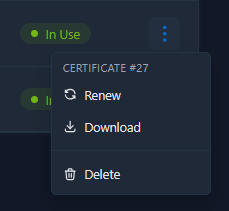 In my case, it is
 27. - Validate your NGINX Proxy Manager certificates path in Unraid:
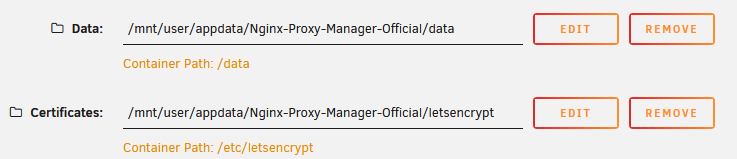 In my case, it is
 /mnt/user/appdata/Nginx-Proxy-Manager-Official/letsencrypt. - Determine where your Unraid cert (PEM) is saved by going to Settings -> Access Management, and looking at the path for your certificate:
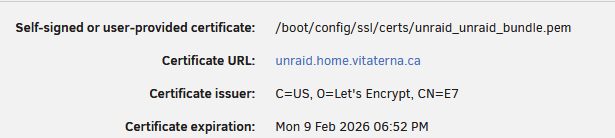 In my case, it is
 /boot/config/ssl/certs/unraid_unraid_bundle.pem. - Finally, create the following script using the User Scripts plugin, updating the variables below with your values:
#!/bin/bash
CERT_ID="27"
NPM_CERT_LOCATION="/mnt/user/appdata/Nginx-Proxy-Manager-Official/letsencrypt"
UNRAID_PEM_LOCATION="/boot/config/ssl/certs/unraid_unraid_bundle.pem"

cat ${NPM_CERT_LOCATION}/live/npm-${CERT_ID}/cert.pem > ${UNRAID_PEM_LOCATION}
cat ${NPM_CERT_LOCATION}/live/npm-${CERT_ID}/fullchain.pem >> ${UNRAID_PEM_LOCATION}
cat ${NPM_CERT_LOCATION}/live/npm-${CERT_ID}/privkey.pem >> ${UNRAID_PEM_LOCATION}
chown root:root ${UNRAID_PEM_LOCATION}
/etc/rc.d/rc.nginx reload- Set this script to run weekly and you can now rely on NPM to keep your unraid certs up to date!